A Call Queue is a powerful tool for managing incoming calls and providing sophisticated call routing. When paired with an Auto Attendant and Time Schedules, a call queue ensures each call reaches the right team member or department, regardless of location or time zone.
Set up your call queue
-
Select Switchboard > your number.
-
Select Inbound > Call Queuing > Configure Queuing Preferences.
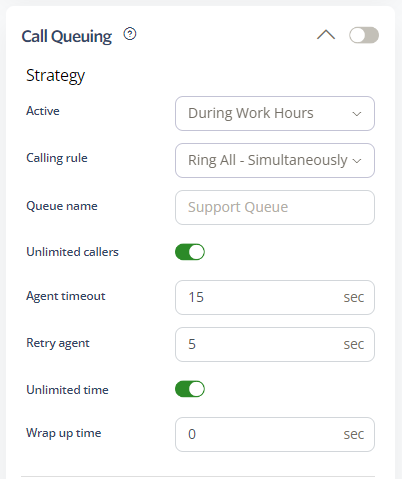
Queue Strategy
The queue strategy determines how frequently agents take calls from the queue.
Schedule
Choose when your call queue is active. Options include All Times, During Work Hours, Outside Work Hours, During Available Hours, Outside Available Hours, During User-Defined Hours, and Outside User-Defined Hours. See our Time Schedules guide for details.
Routing Rule
-
Ring All: Rings all agents simultaneously.
-
Round Robin: Rings available agents in order.
-
Least Ring: Rings the agent least recently called.
-
Fewest Calls: Rings the agent with the fewest completed calls.
-
Random: Rings a random available agent.
-
Memory Round Robin: Rings each available agent in turn once.
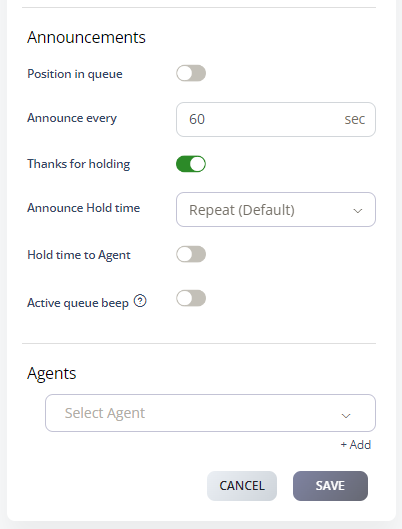
Queue Announcements
Customise how callers and agents receive information about queue status.
-
Position in queue: Announces the caller’s position in the queue.
-
Hold time to agent: Notifies the agent of how long the caller has been waiting.
-
Active call queue beep: Alerts the agent when a call enters the queue. When enabled, the agent can transfer calls between agents and accept new queue calls.