



AI Voice Agent
Never miss another call.
Learn more


AI Voice Agent
Never miss another call.
Call Check lets you verify that your number is externally accessible from outside the SIPcity network, and have detailed information to help diagnose and investigate issues with your phone number and calls.
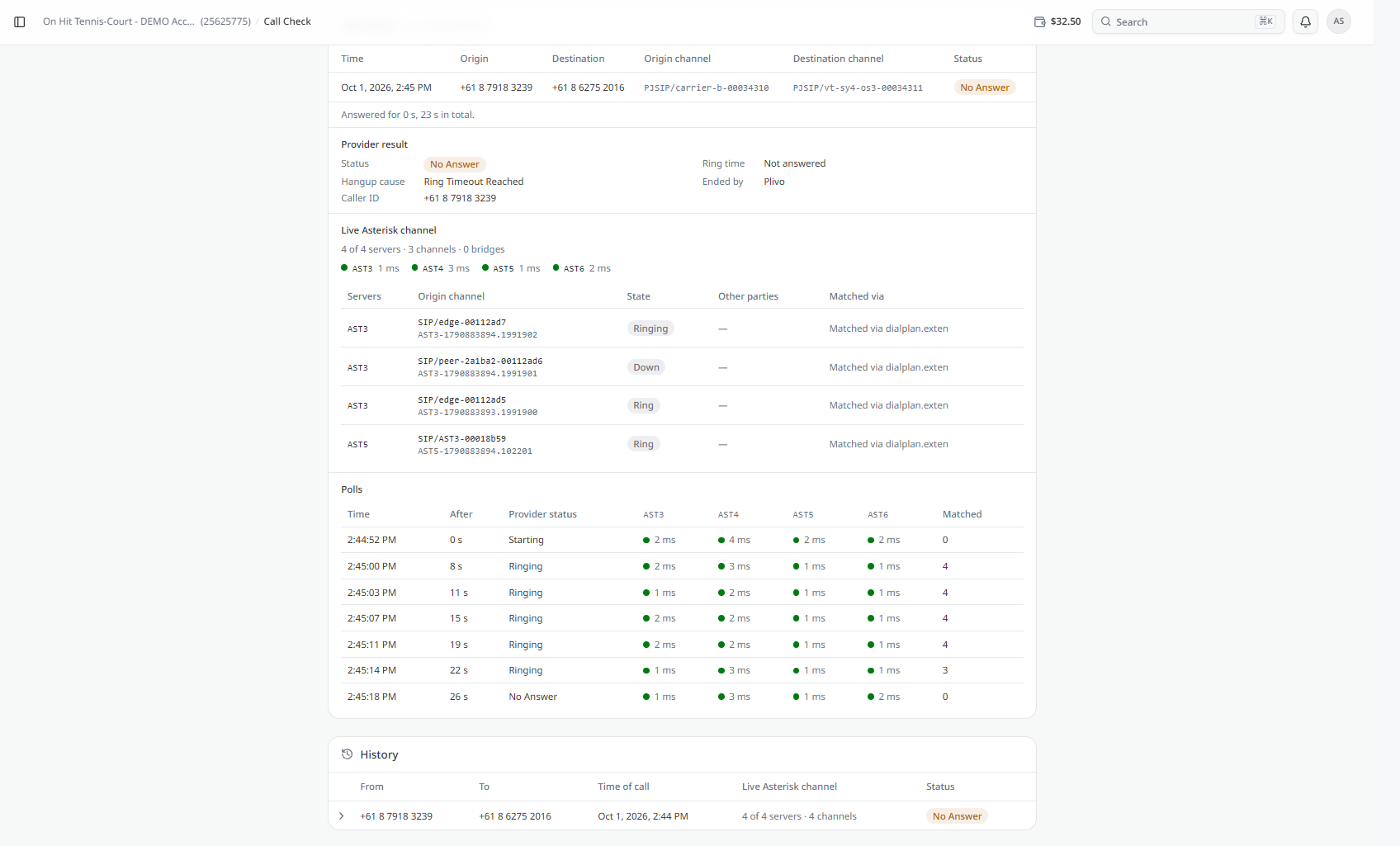
The Call Check page allows you to place a test call to a number on your account and monitor the call while it is in progress.
To open the page, select Call Check from the left-hand navigation menu.
At the top of the page, use Check number to select the number you want to test.
Select Call to place the test call.
The page displays the current call status while the test is running. A message also shows when you can place another call.
Once a test call is placed, the page displays information about the call, including:
The page also displays the total time for which the call was answered and the total call duration.
The Provider result section displays additional information about the test call, including:
The information shown in this section can vary depending on the result of the test call.
The Live Asterisk channel section displays information about the channels involved in the test call while it is being processed.
The summary shows the number of servers, channels, and bridges involved.
The server list includes:
The Polls section shows periodic updates collected while the call is being processed.
Each entry includes:
These entries allow you to follow how the call progressed during the test.
The History section displays previous test calls.
Each entry includes:
Select a history entry to review its available call details.
You can also click Call Flow to view that number’s flow, including SIP peering settings and which features it uses, which have different priorities.








