



AI Voice Agent
Never miss another call.
Learn more


AI Voice Agent
Never miss another call.
Call Screening uses AI to detect whether an inbound call is from a human or automated system. If the call is from a human, you’re prompted to accept, send to voicemail, or reject it. Accepted calls are added to your permitted list, while rejected calls are blocked.
Select Switchboard > your number.
Select Inbound > Call Screening Options.
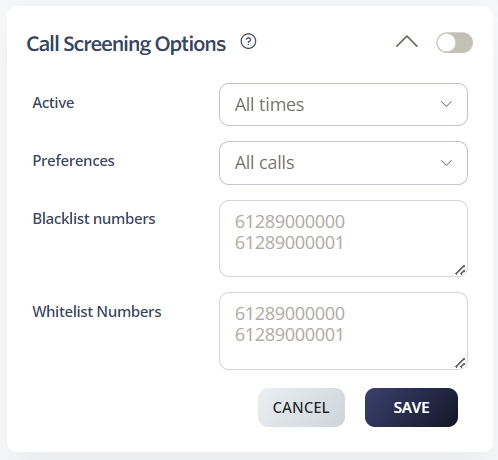
Choose when Call Screening is active. Options include All Times, During Work Hours, Outside Work Hours, During Available Hours, Outside Available Hours, During User-Defined Hours, and Outside User-Defined Hours. See our Time Schedules guide for details.
Choose which calls to apply screening to: All Calls, Spam Calls, or Anonymous Calls.
Add specific numbers that you do not want to receive calls from. These numbers will be blocked in addition to numbers blacklisted by your screening settings.
Add specific numbers that are always allowed to reach you, even if your screening settings would normally block them.
Click Save to update your settings.








