



AI Voice Agent
Never miss another call.
Learn more


AI Voice Agent
Never miss another call.
Voicemail lets you manage messages from anywhere with personal greetings, save, delete, forward, and email delivery. You can also use transcription AI to email both the recording and a text transcript to your nominated email address.
To access voicemail settings:
Log in to your account.
Select Switchboard > Number.
Select Inbound > Voicemail Service.
Click Save to update settings.
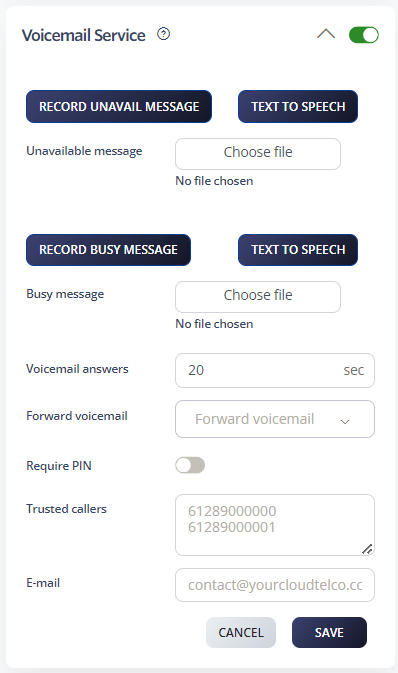
Enter your call-back phone number and record your Unavailable or Busy messages. Follow the prompts to confirm or re-record.
Upload MP3 recordings for higher quality Unavailable or Busy messages.
Note: The maximum file size is 400 KB. For larger files, we recommend a 256 KB recording rate.
Access your voicemail box: Dial *55 to listen to your messages.
Voicemail PIN: To access voicemail from another phone, you’ll need a PIN code. Press *55 during the message and enter your PIN followed by #.
Trusted callers: Create a trusted caller list to skip the PIN entry. Callers on this list can access your voicemail without entering a code.
Voicemail ring delay: Set how many seconds to wait before diverting calls to voicemail.
Email delivery: Enter the email address where voicemail messages should be sent.
Transcription: Enable this to receive voicemail as both a recording attachment and text transcript in your email.
Remote access: Dial your own number from any phone and press *55 when voicemail answers, then enter your PIN followed by # to access messages remotely.
View in account: Check new voicemails by logging into your account and clicking the Messages tab.
Use these keys while listening to voicemail messages:
4 — Previous message
5 — Repeat current message
6 — Next message
7 — Delete
8 — Forward
9 — Save








