








Purpose
Sets the correct time zone for the phone system to keep call logging, scheduling, and time-based routing accurate. Proper configuration ensures consistent records and coordination across regions, minimizing scheduling conflicts and timestamp discrepancies.
How to Navigate
Log in to the SIPcity portal. Then, go to:
SwitchBoard | Preferences | Time Zone section.
How to Configure
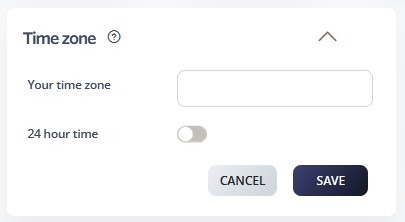
- Open the Time Zone settings panel
- Configure “Your time zone” by clicking the configuration button (red button in the interface)
- Enable or disable “24-hour time” using the toggle switch
- Select the local time zone from the available options
- Verify the time display format matches the desired 12‑hour or 24‑hour preference
- Click SAVE to apply the time zone settings
- Test by checking call logs and scheduling features to confirm correct time display
- Update time zone settings when traveling or relocating operations