








Purpose
Hunt Group distributes incoming calls across multiple extensions or agents using configurable routing patterns. Moreover, this sequential hunting system ensures available team members answer calls efficiently. Because different teams work differently, the system uses intelligent distribution algorithms and rotation strategies.
How to Navigate
Begin by logging into the SIPcity portal. Then, access SwitchBoard | Inbound | Hunt Group section.
How to Configure
- Enable Hunt Group functionality
- Configure Active hunting strategy
- Set Start hunt group parameters
- Enable Connect as normal option
- Add phone Numbers to the hunt sequence
- Configure Hunt start point and rotation
- Set hunting patterns (sequential, circular, etc.)
- Test and save configuration
Hunt Group Settings
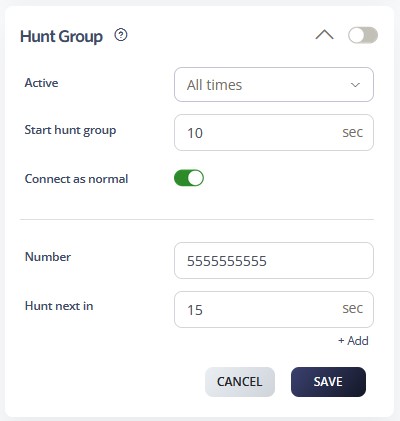
- Active Schedule: Configure the operational timeframe for the call queue. Options include All Times, During Work Hours, Outside Work Hours, During Available Hours, Outside Available Hours, During User-Defined Hours, and Outside User-Defined Hours. For additional guidance, please refer to the Time Schedules Guide.
- Start Hunt Group: Each number within the Hunt Group can be assigned a specific timeout period before the call progresses to the next number. The default timeout is 10 seconds per number.
- On Number – Select the number you wish to include in the Hunt Group.
- On Hunt Next In – Define the number of seconds before the call advances to the next number.
- +Add – Use this option to add additional numbers to the Hunt Group.
Note: Numbers are always dialed in sequential order. Arrange your Hunt Group numbers according to the priority in which you want calls to be answered
Call Flow Priority – #9
Hunt Groups operate at priority level 9. Therefore, they distribute calls among multiple group members using predefined algorithms.
Conference → Rejection Strategy → Auto Attendant → Call Queue → Sim Ring → Do Not Disturb → Preserve CLI → Call Screening → Hunt Groups
Learn more about Call Flow Priority →