



AI Voice Agent
Never miss another call.
Learn more


AI Voice Agent
Never miss another call.
The Plan & Usage page lets you review your current plan, included services, add-ons, recurring charges, account balance, and plan history.
To open the page, select Plan & Usage from the left-hand navigation menu.
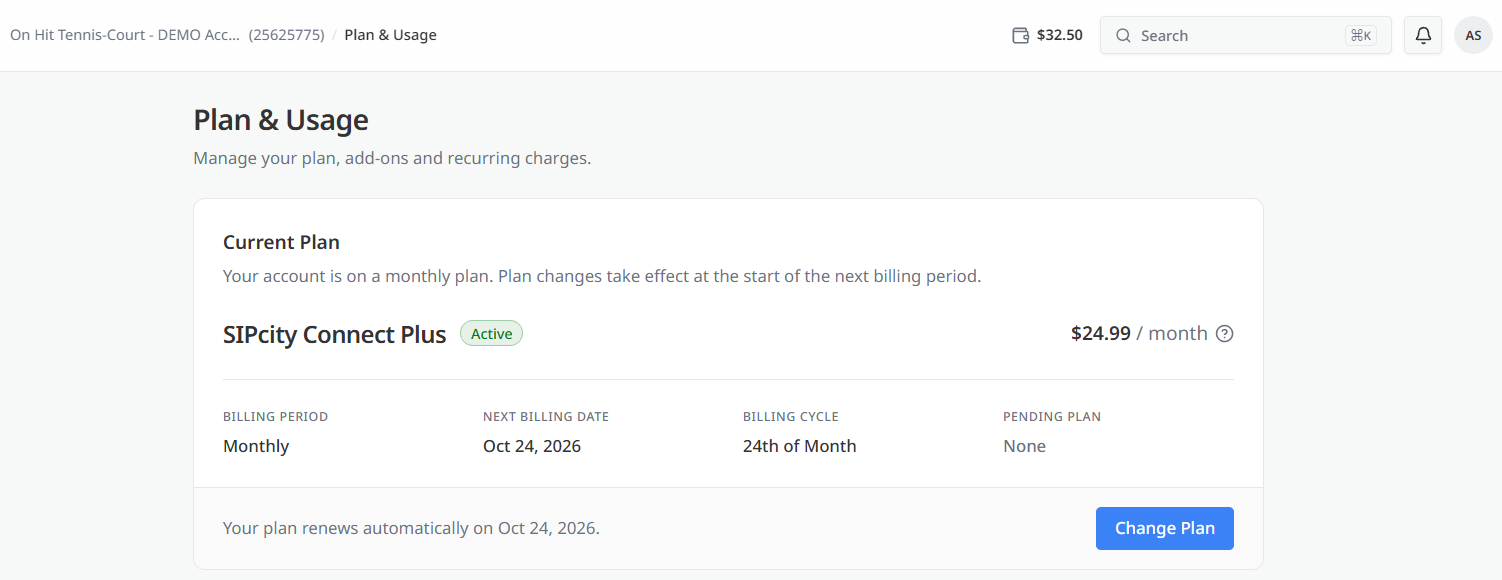
This section shows the plan currently assigned to your account. It also indicates that your account is on a monthly plan and that plan changes take effect at the start of the next billing period.
The plan name appears alongside its status and monthly cost. The summary row below includes:
A note below the plan confirms the date on which it renews automatically.
Select Change Plan to choose a different plan.
cally. The Change Plan button allows you to select a different plan.

This section shows what your plan includes and the services billed to your account each month.
The Plan Inclusions table displays:
A second table lists the numbers and channels on your account, including the quantity, unit price, and total charge for each item.
The You Pay Monthly total appears at the bottom of the section.
Select Billing to open the Billing page for additional billing details.
The Add-ons section allows you to extend your plan with additional calling minutes or mobile allowances. Add-ons renew together with your plan.
Two add-ons are available:
Each add-on displays its current status and an Add button. Select Add to apply an add-on to your account.
This section displays your current account balance. Usage charges are deducted from this balance.
You can add funds to your balance at any time or use auto top-up, which is configured from the Billing page.
A status indicator next to the section heading shows whether the account is in credit. A note below the balance indicates whether a credit limit is in place and whether auto top-up is enabled.
Select Add credit to add funds to your account balance.
The Plan History section lists the plans that have been added to your account and the charge applied when each plan was added.
Each entry includes:








