



AI Voice Agent
Never miss another call.
Learn more


AI Voice Agent
Never miss another call.
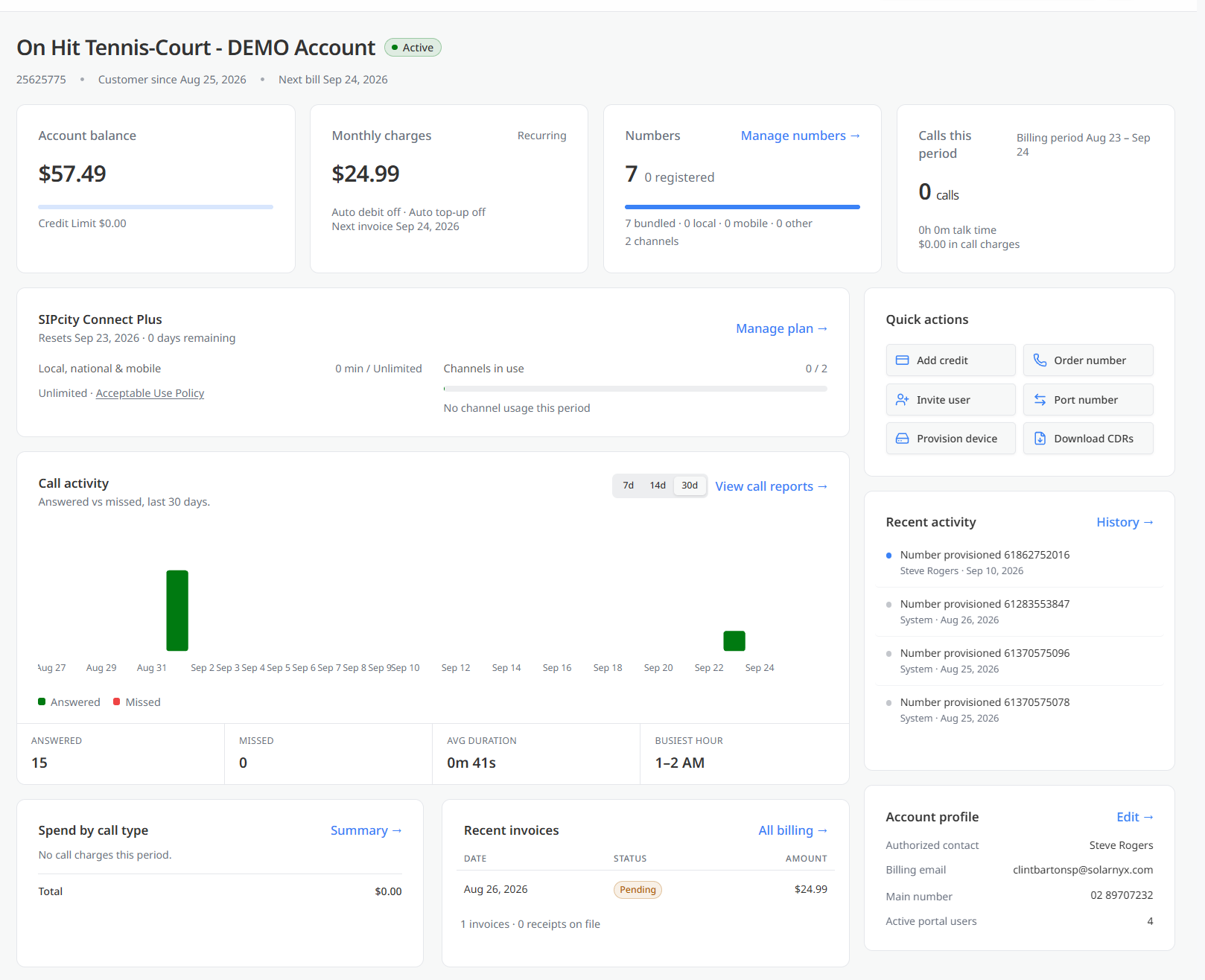
The Overview page is the main dashboard for your SIPCity account and the first screen displayed when you sign in. It provides a summary of your account status, billing information, plan and usage, and recent activity.
Use the Overview page to quickly review key account information and access frequently used actions.
The account header at the top of the page displays:
The upper section of the Overview page contains four summary cards.
The Account balance card displays the current amount owed on the account and your credit limit.
The Monthly charges card displays your recurring monthly cost and indicates whether automatic debit and automatic top-up are enabled.
It also displays the date of your next invoice.
The Numbers card displays the total number of phone numbers assigned to your account.
It also provides a breakdown of how those numbers are registered and displays the number of channels in use.
The Calls this period card displays information about calls made during the current billing period, including:
The Plan section displays information about your current plan, including:
A link to the Acceptable Use Policy is also provided for reference.
The Quick actions panel on the right-hand side of the page provides shortcuts to frequently used tasks.
Available actions include:
The navigation menu on the left-hand side of the screen provides access to the main sections of your account.
These include:
A separate group contains additional management options, including:
Select an item from the navigation menu to open the corresponding section of your account.








