
SIPcity Web Portal: Add Device

Add a device by selecting its model, entering its device name and MAC address, and configuring its time zone and time format.

Add a device

Select Add device to open the Add device window.
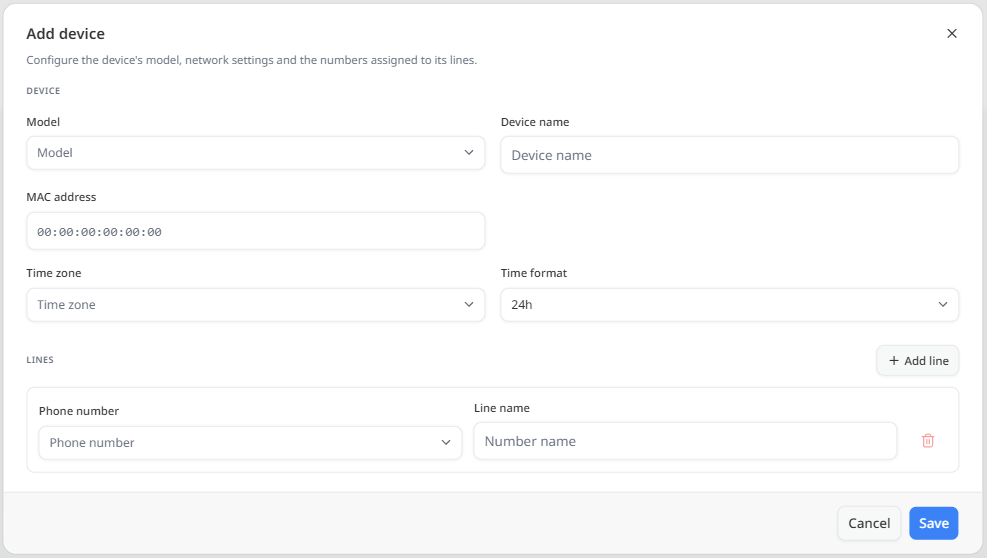
A note beneath the window title explains that the window is used to configure the device model, network settings, and the numbers assigned to its lines.

Device Settings

The Device section contains the core settings for the device:

  • Model — Select the make and model of the device.
  • Device name — Enter a name for the device. A generate option is available beside the field.
  • MAC address — Enter the device’s MAC address.
  • Time zone — Select the time zone for the device.
  • Time format — Select the time format used on the device, such as 24h.

Was this article helpful?

Let us know so we can keep improving our guides.

Thank you for your feedback!

This form is only for article feedback. If you require assistance, please contact Support. How can we improve this page?

Related Articles

Still need help?

Our support team can help you get connected.






