








Purpose
Trunking manages SIP connections for both inbound and outbound calling, controlling how calls traverse the network. Configuration enables the assignment of pilot numbers, prioritized routing, and failover behavior to maintain service continuity during outages or congestion.
Trunking Preferences
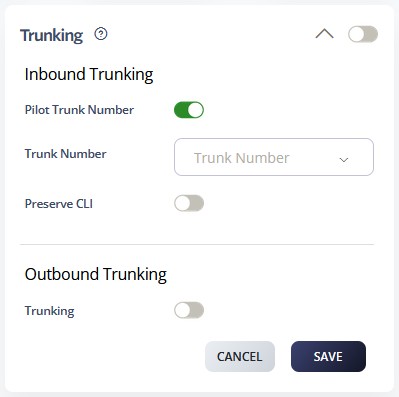
Inbound Trunking
Inbound trunking allows an admin to route multiple numbers to a single registered number. This is especially useful for on‑premise PBX systems that do not support SIP peering to a static IP address.
Outbound Trunking
Outbound trunking is a registration feature that lets you present the CLI (Caller Line Identification) of another number on your account. It uses a trunking number to simplify management, eliminating the need to individually register large blocks of numbers just to preserve CLI presentation.
How to Navigate
Log in to the SIPcity portal. Then, go to:
SwitchBoard | Preferences | Trunking section.
How to Configure
Inbound Trunking
- Enable Inbound Trunking using the toggle switch
- Configure Pilot Trunk Number for incoming call routing
- Set trunk priorities and failover options to define backup paths
- Test inbound call routing to verify trunk functionality
Outbound Trunking
- Enable Outbound Trunking using the toggle switch
- Configure outbound trunk selection criteria
- Set least cost routing preferences to optimize outbound path selection
- Configure trunk capacity and concurrent call limits
- Click SAVE to apply trunking configuration
- Monitor trunk utilization and adjust settings as needed
- Test outbound calling to verify proper trunk selection