








Manage your account’s payment and billing settings, including auto top-up and notifications.
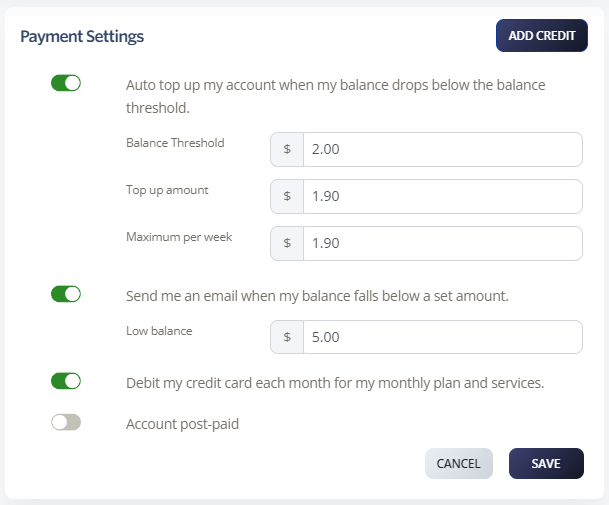
Auto top-up settings
Automatically top up your account when your balance drops below a set threshold. At the end of each billing month, your account is topped up to your nominated level.
-
Log in to your account.
-
Go to Billing > Payment Settings.
-
Enable Auto top-up my account when my balance drops below the balance threshold.
-
Set the following:
-
Balance Threshold: When your account drops below this amount, auto top-up occurs.
-
Top-up Amount: The amount your account is topped up to.
-
Maximum per week: Your weekly spend limit. Set to $0.00 for unlimited weekly spending.
-
-
Click Save.
Notification settings
Receive an email when your account balance falls below a set amount.
-
Log in to your account.
-
Go to Billing > Payment Settings.
-
Enable Send me an email when my balance falls below a set amount.
-
Set your Low Balance amount. You’ll receive an email notification when your account drops below this.
-
Click Save.
Auto debit
Set your credit card to be automatically charged for monthly plans, services, and automatic top-ups.
-
Log in to your account.
-
Go to Billing > Payment Settings.
-
Enable Debit my credit card each month for my monthly plan and services.
-
Click Save.