








Purpose
Simultaneous Ring allows incoming calls to ring multiple devices or extensions simultaneously with configurable timing controls. Moreover, this multi-device strategy ensures quick call answering by having multiple endpoints ring concurrently. Consequently, your team maximizes availability and response time.
How to Navigate
Start by logging into the SIPcity portal. Then, proceed to SwitchBoard | Inbound | Simultaneous Ring section.
How to Configure
- Enable Simultaneous Ring toggle
- Add multiple phone Numbers to ring simultaneously
- Configure ring timing and duration
- Set priority levels for different numbers
- Enable/disable Active status for each number
- Configure Ring delay settings between devices
- Test and save configuration
Simultaneous Ring Settings
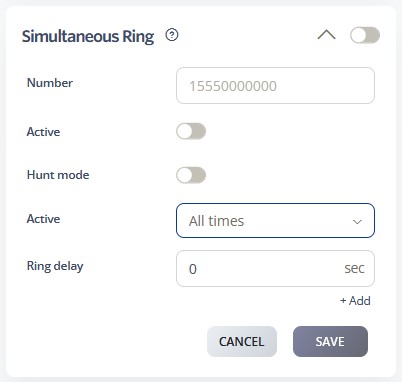
- Number – The designated line will ring simultaneously with the specified number.
- Active Schedule – Defines the timeframe during which the call queue is active. Options include All Times, During Work Hours, Outside Work Hours, During Available Hours, Outside Available Hours, During User-Defined Hours, and Outside User-Defined Hours. For additional details, please refer to the Time Schedules Guide.
- Hunt Mode – Enable this option to bypass conditions such as Caller Busy, Voicemail, and Call Forwarding.
- Ring Delay – Specifies the number of seconds to wait before initiating the simultaneous ring. A value of 0 indicates that ringing begins immediately.
Call Flow Priority – #5
Simultaneous Ring operates at priority level 5. Therefore, it rings multiple devices simultaneously to maximize call connection opportunities.
Conference → Rejection Strategy → Auto Attendant → CallQue → Sim Ring
Learn more about Call Flow Priority →