








Purpose
Automatically or manually record phone conversations to support quality assurance,
compliance, training, and legal documentation. Options include recording all calls or specific call types, with configurable storage and email delivery to align with organizational policies.
How to Navigate
Log in to the SIPcity portal. Then, go to:
SwitchBoard | Advanced | Call Recording section.
How to Configure
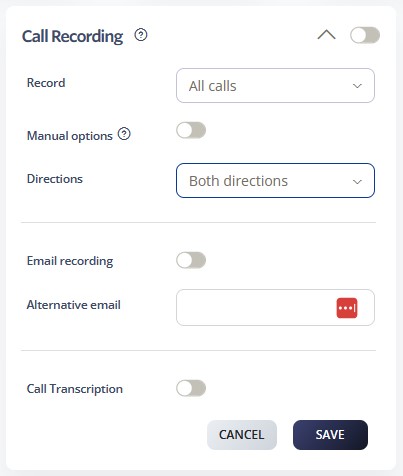
- Enable Call Recording using the main toggle switch.
- Select Record type from the dropdown (e.g., “All calls” or specific call categories)
- Configure the Manual options toggle to allow user-controlled recording activation
- Set Directions preference (Inbound only, Outbound only, or Both directions)
- Inbound calls only
- Outbound calls only
- Both directions (recommended for complete conversations)
- Enable Email recording to automatically send recordings via email
- Configure an Alternative email address for recording delivery
- Set up email notifications and delivery schedules
- Click SAVE to activate call recording settings
- Test recording functionality with sample calls
- Ensure compliance with local recording laws and notification requirements
- Set up secure storage and retention policies for recorded calls