








Purpose
Call Queuing manages incoming call flow by placing callers in organized queues when all agents are busy. Furthermore, this advanced queuing system includes hold music and estimated wait times. Because customer experience matters, the system also provides intelligent routing to available agents based on various distribution strategies.
How to Navigate
First, log in to the SIPcity portal. Subsequently, go to SwitchBoard | Inbound | Call Queuing section.
How to Configure
- Enable Call Queuing Strategy
- Configure Active agent selection criteria
- Set up Queue name and identification
- Configure the Unlimited callers option or set limits
- Set Agent timeout and Retry options
- Enable Unlimited time or set maximum wait times
- Configure wrap-up time between calls
- Define queue announcements and hold music
Strategy
The Call Queue Strategy defines the distribution pattern and scheduling rules that govern how calls are routed to agents.
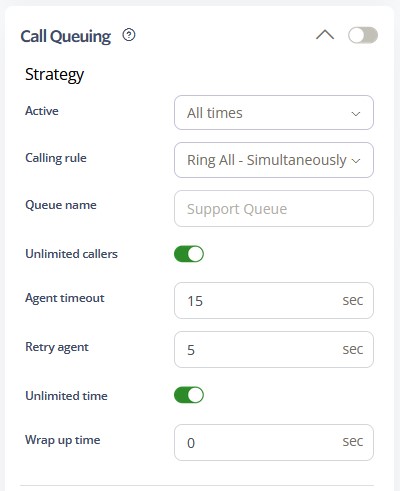
-
Active Schedule: You may configure the operational timeframe for the call queue, selecting from options such as All Times, During Work Hours, Outside Work Hours, During Available Hours, Outside Available Hours, During User-Defined Hours, and Outside User-Defined Hours. For comprehensive details, please consult the Time Schedules Guide.
-
Ring All – Simultaneously alerts all agents in the queue.
-
Round Robin – Sequentially routes calls to agents based on their assigned order.
-
Least Recently Called – Directs the call to the agent who has gone the longest without receiving one.
-
Fewest Calls – Prioritizes the agent with the lowest number of completed calls.
-
Random – Distributes calls unpredictably among available agents.
-
Memory Round Robin – Cycles through available agents, ensuring each receives a turn before the sequence restarts.
You can further refine the call queue experience by configuring how information is communicated to both callers and agents during the call transfer process.
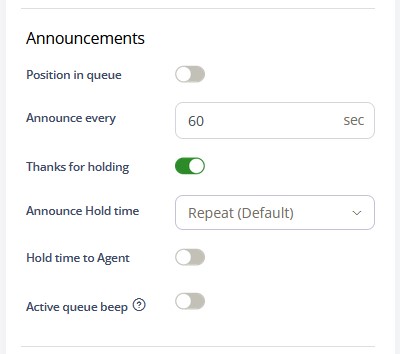
- Position in Queue – Announces the caller’s current place in the queue.
- Hold Time to Agent – Informs the agent of the total time the caller has been waiting in the queue.
- Active Call Queue Beep – Provides an audible notification to agents already on a call, indicating that a new call is waiting in the queue. This setting must be enabled to allow agents to transfer active calls between one another and subsequently accept a new call from the queue.
Call Flow Priority – #4
Call Queuing functions at priority level 4. As a result, it manages incoming calls in organized queues for available agents.
Conference → Rejection Strategy → Auto Attendant → Call Queuing
Learn more about Call Flow Priority →