








Purpose
Forwarding automatically redirects incoming calls to another phone number or extension based on various conditional triggers. Moreover, this advanced forwarding system handles busy, no-answer, or unconditional scenarios efficiently. Because businesses operate globally, the system also offers geographical routing options and flexible destination management.
How to Navigate
Start by logging into the SIPcity portal. Subsequently, proceed to SwitchBoard | Inbound | Forwarding section.
How to Configure
- Enable the Forwarding feature
- Select Forward destination type (Always, number)
- Configure the forwarding Number destination
- Set up conditional forwarding rules
- Configure forwarding for different scenarios
- Set up geographical forwarding options
- Define Area and Number parameters
- Test forwarding functionality and save
Forward Settings
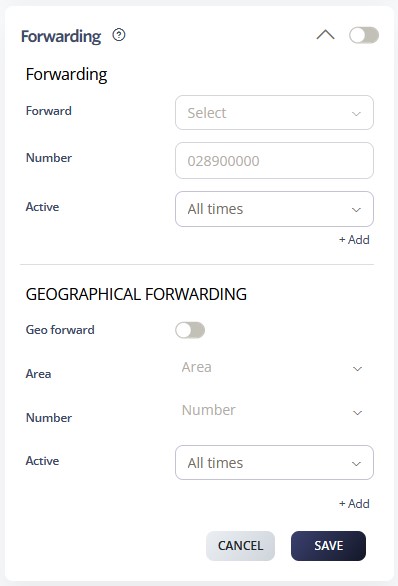
Call forwarding allows you to manage incoming calls by setting up different rules depending on your availability. You can apply a general rule for all situations, or create specific rules for scenarios such as when you are busy, offline, or unable to answer.
Forwarding
- Always: Activate call forwarding at all times
- When Unavailable: Forward calls you miss while offline or unavailable to voicemail, another number, a user, or a group.
- When Busy: Decide how long a call should wait while you are on another call, and choose whether to forward it to voicemail, another number, a user, or a group.
- When Offline: Forward calls you receive while offline to voicemail, another number, a user, or a group.
- Turn Off for Now: Temporarily disable call forwarding.
Note: Rules are applied in the following priority order:
-
Always
-
Busy / Unavailable
-
Offline
Active: Select the hours of operation. See also Time Schedules.
Geographical Forwarding
Geographical forwarding lets you route incoming calls based on the caller’s location. This is especially useful for companies operating in multiple regions with one main phone number.
Example: If your business operates in New York and California, you can forward calls from New York to a specific number during after-hours.
How to Enable Geographical Forwarding
-
Select the area you want to forward calls from.
-
Choose the destination number for those calls.
-
Define the schedule for when this forwarding should apply.
Call Flow Priority – #11
Call Forwarding operates at priority level 11. Therefore, it redirects calls to alternative destinations when the primary recipient is unavailable.
Conference → Rejection Strategy → Auto Attendant → Call Que → Sim Ring → Do Not Disturb → Preserve CLI → Call Screening → Hunt Groups → Call Waiting → Call Forwarding
Learn more about Call Flow Priority →