








The Auto Attendant is your virtual receptionist, greeting callers on any schedule 24 hours a day. It reduces abandon rates, directs callers to the correct department or workgroup, and presents a clear, consistent greeting. As your company grows, you can attach your Auto Attendant to Call Queuing to add sophisticated call routing.
Create an Auto Attendant
-
Switchboard > Select your main phone number
-
Select Inbound > Auto Attendant
-
Configure your settings
-
Click Save
Auto Attendant Welcome Greeting
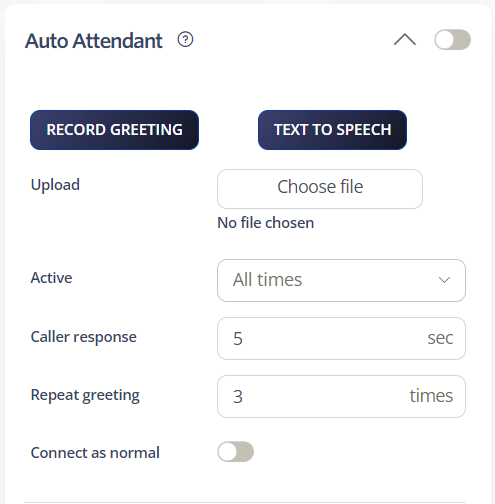
Create a welcome greeting. When the message finishes, the Auto Attendant guides callers to the next active feature on the Call Flow Priority list.
-
Record Greeting: Use the dial-back feature to quickly enable your Auto Attendant, or upload a higher quality recording
-
Time Schedules: Select the hours of operation
-
Caller response: Set how long the Auto Attendant will wait for the caller to enter an option
-
Repeat greeting: Set how many times the greeting will be played to the caller. If 1 (default), the greeting plays when the call is answered. If 2, the greeting plays when answered and again after the timeout
-
Connect as normal: If enabled, the call diverts to the device where the extension is registered after the timeout. If disabled, the call is hung up after the timeout
Caller Options
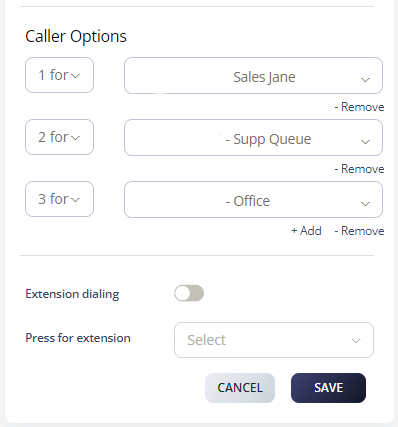
With the Auto Attendant, you can set caller options where you assign a specific number for the department or office you want your caller to reach. To set this up:
-
Navigate to Switchboard > Inbound
-
Select Auto Attendant > Caller Options
-
Choose a number and select the telephone number you want callers to reach
-
Click Save
Your Auto Attendant is now ready to welcome callers and direct them where they need to go.