Registration and Peering Explained

The difference between SIP registration and SIP peering, and when each applies.

SIP Registration

We support most SIP-based VoIP devices, including Analogue Telephone Adaptors (ATA), IP phones, IP PBX systems, and softphones.

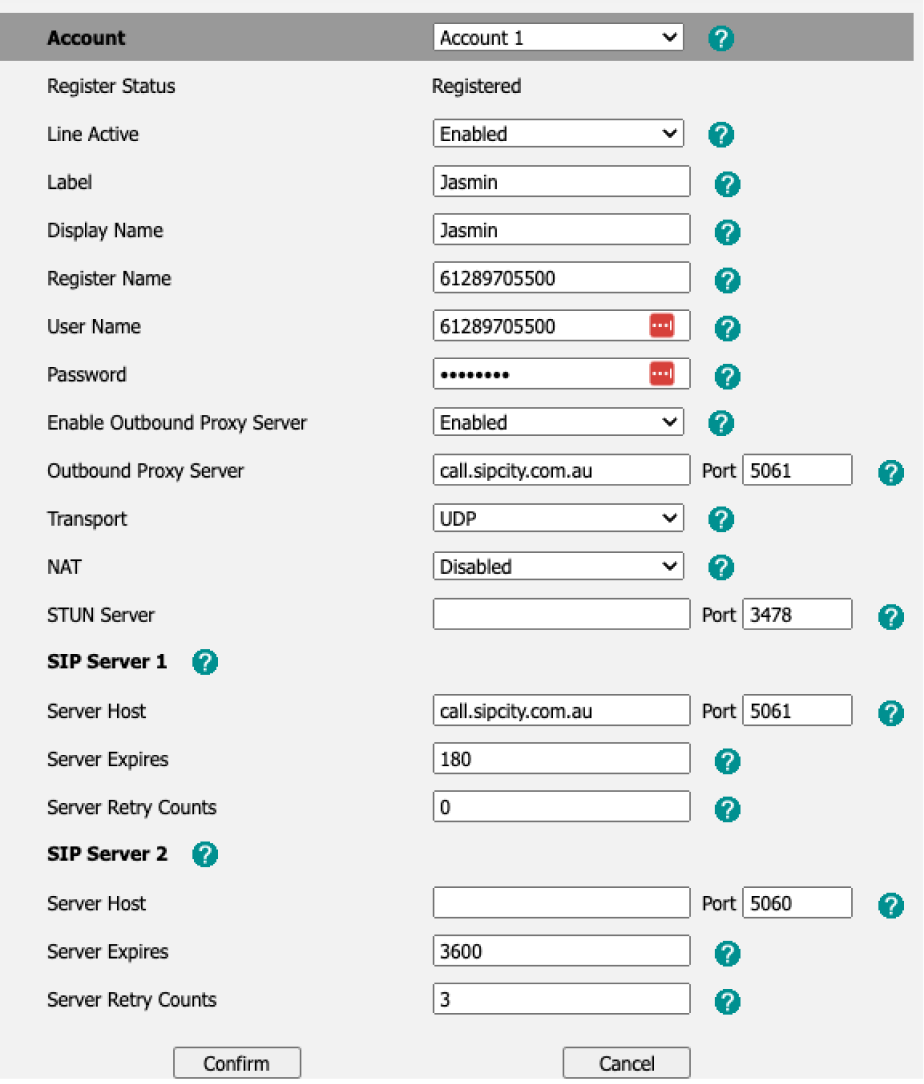
Generic SIP registration settings

  • Display Name: Your caller ID.

  • Proxy Server: call.sipcity.com.au

  • User name / Account ID / Authenticate ID: The phone number you are registering (e.g. 61xxxxxxxxxx).

  • Password: Your number’s password.

  • Transport: UDP 5060 / TLS 5061

  • Server Expires: 180

  • Register with the Proxy: Yes

  • Make calls without registration: No

  • Codecs: G711a/u, G729

SIP Peering

SIP Peering enables a direct trusted IP-to-IP network connection between your IP PBX and our voice network via a static WAN IP address.

Recommended settings

  • Proxy: 103.55.116.65 (103.55.116.0/24)

  • Recommended Firewall rule: 103.55.116.0/24

  • Ports: UDP 5060 or TLS 5061

Peering modes

We support three variations of SIP Peering:

  • Global SIP Peering: All numbers on an account are directed to a single customer IP address.

  • Standalone: A single number is directed to a standalone IP address.

  • Trunking: Supports on-premises PBX devices connecting via device registration (username and password). Allows administrators to configure a single registration number to their PBX whilst preserving the CLI of all outgoing numbers.

See also: