
Device Provisioning for Grandstream ATAs

Automatically provision Grandstream ATA devices to connect analogue phones to SIPcity.

Register your Grandstream device in Device Provisioning to get it up and running in minutes with automatic configuration.
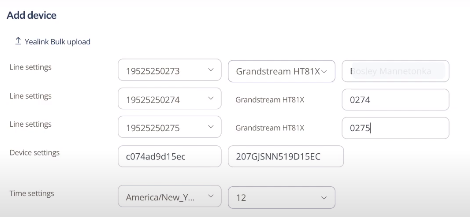
Provision a Grandstream device

  1. Log in to your account.
  2. Click Tools > Device Provisioning.
  3. Select Add Device.
  4. Select the Device Type (choose your Grandstream model).
  5. Configure Line Settings:
    • Select the phone Number
    • Select Grandstream
    • Enter a device name
  6. Enter the MAC address of the device.
  7. Configure regional settings:
    • Select your Time Zone
    • Select Time Format
  8. Under Line Key2, select the phone number or feature to assign.
  9. Click Save and manually restart the handset.
  10. Once provisioned, any changes you make in the portal automatically restart the handset to apply updates.






