



AI Voice Agent
Never miss another call.
Learn more


AI Voice Agent
Never miss another call.
Manage your account’s payment and billing settings, including auto top-up and notifications.
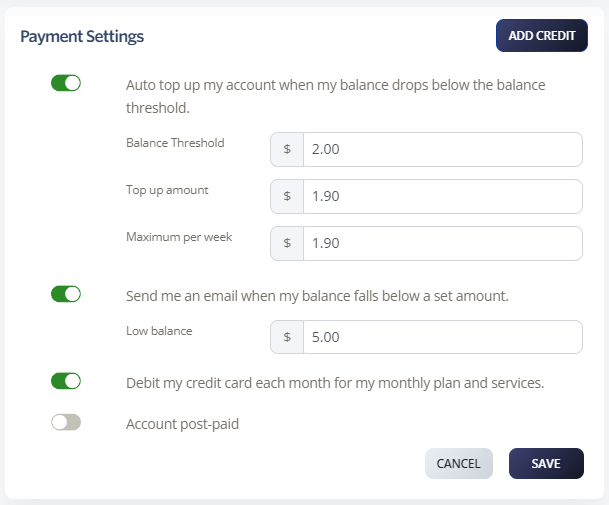
Automatically top up your account when your balance drops below a set threshold. At the end of each billing month, your account is topped up to your nominated level.
Log in to your account.
Go to Billing > Payment Settings.
Enable Auto top-up my account when my balance drops below the balance threshold.
Set the following:
Balance Threshold: When your account drops below this amount, auto top-up occurs.
Top-up Amount: The amount your account is topped up to.
Maximum per week: Your weekly spend limit. Set to $0.00 for unlimited weekly spending.
Click Save.
Receive an email when your account balance falls below a set amount.
Log in to your account.
Go to Billing > Payment Settings.
Enable Send me an email when my balance falls below a set amount.
Set your Low Balance amount. You’ll receive an email notification when your account drops below this.
Click Save.
Set your credit card to be automatically charged for monthly plans, services, and automatic top-ups.
Log in to your account.
Go to Billing > Payment Settings.
Enable Debit my credit card each month for my monthly plan and services.
Click Save.








