
Billing Records (CDR)

Search, view, and export your call detail records for billing and reporting.

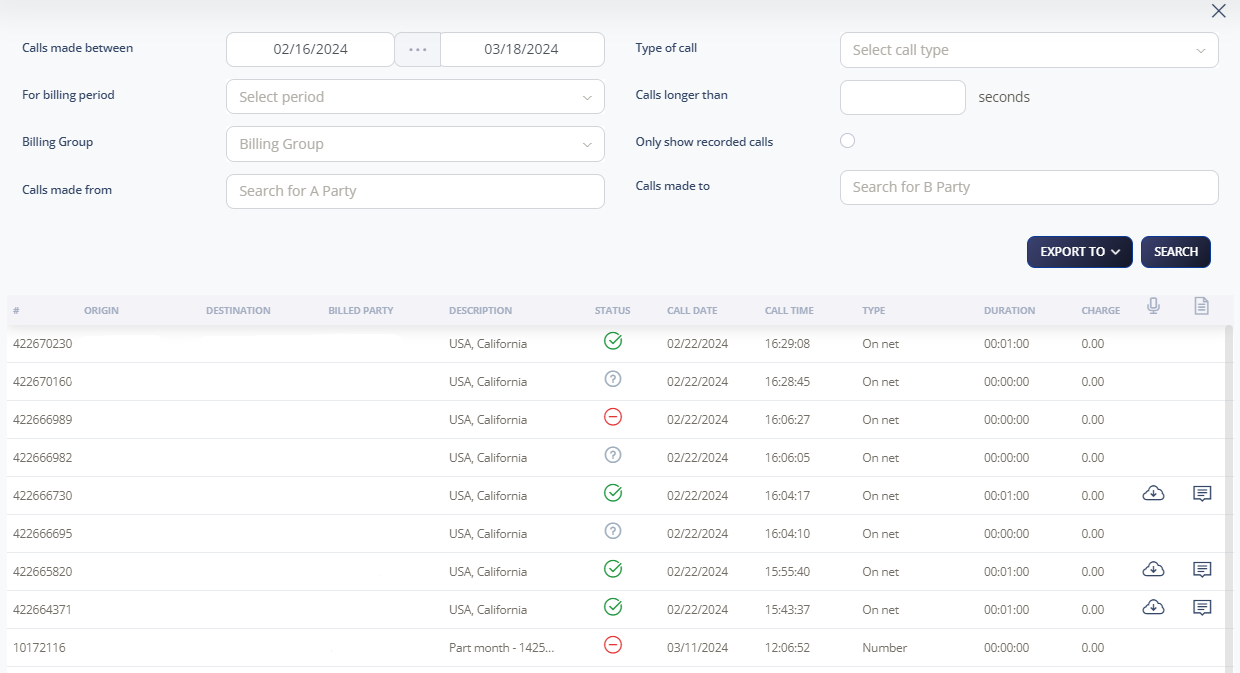
Search your Call Data Records (CDR) and billing records, refining your search by date, billing period, length, and call type.

Note: All call records are displayed in US Pacific Time (PST).

Search Billing Records

  1. Select Billing > Billing records

  2. Set search parameters: calls made between, billing period, billing group, calls made from, call type, call duration, recorded calls only, and calls made to

  3. Click Search or Export CSV to access your billing records

Note: Use Advanced search to narrow your search and make it easier to find specific billed calls.

Call Data Record Information

Your CDR includes the following information:
  • Account code
  • A Party (calling party)
  • B Party (called party)
  • Channel used
  • Destination changes
  • Last application
  • Call start time
  • Call answer time
  • Call end time
  • Call duration
  • Bill seconds
  • Call result
  • Diverting number
  • Unique ID for call
  • Hang up reason

Note: When Call Recording is enabled, you can download the recording of the call and access the call transcription.






