








Purpose
Manages music and audio content played during hold and queue wait times to improve the caller experience and maintain a professional presentation. Proper volume, ring balance, and file selection reduce fatigue and enhance perceived wait quality.
How to Navigate
Log in to the SIPcity portal. Then, go to:
SwitchBoard | Media | Queue & Hold Music section.
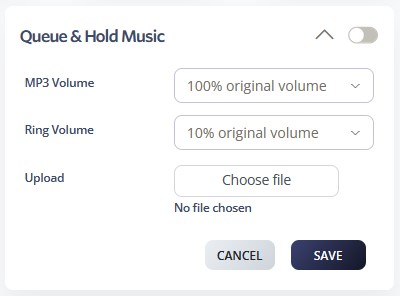
Configuring Queue & Hold Music
1. Enable
- Turn on Queue & Hold Music using the main toggle.
2. Volume Settings
- Music Volume: Default 100%; adjust for comfortable listening (not too loud or too soft).
- Ring Volume: Default 10%; balance so rings are audible but not overpowering.
- Always test with real calls to validate sound levels.
3. Upload Music
- Click Choose file to upload a background track (.mp3 or .wav).
- Status changes from No file chosen to the uploaded file name.
4. Music Guidelines
- Use royalty‑free or licensed audio only.
- Choose professional, instrumental, or ambient tracks without vocals or abrupt changes.
- Consider cultural sensitivity and the caller’s experience.
5. Save & Test
- Click SAVE to apply.
- Place test calls to check playback, looping, and volume balance.
- Update files periodically to keep music fresh and professional.