








Purpose
This feature enforces call control while guaranteeing access to essential numbers. By allowing specified destinations to bypass outbound restrictions, critical services, emergency contacts, and priority partners remain reachable without weakening broader security and cost controls.
How to Navigate
Log in to the SIPcity portal. Then, go to:
SwitchBoard | Outbound | Whitelist section.
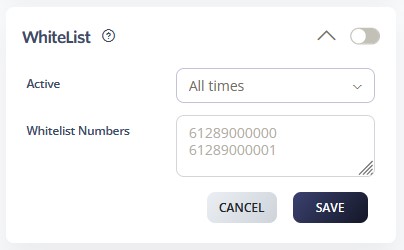
How to Configure
- Enable the Whitelist feature using the main toggle
- Set Active status to “All times” or configure specific time periods
- Add approved numbers in the Whitelist Numbers field, one per line.
Example entries:- 61289000000
- 61289000001
- Include emergency numbers, key business contacts, and critical services
- Configure time-based whitelist rules if needed
- Click SAVE to activate whitelist protection
- Test outbound calls to whitelisted numbers to verify access
- Review and update whitelist entries regularly
- Document whitelist changes for audit purposes