








Purpose
This feature maps frequently dialed external numbers to short codes, enabling rapid outbound dialing without entering full numbers. It improves efficiency, reduces misdials, and standardizes quick access to common contacts across the organization.
How to Navigate
Log in to the SIPcity portal. Then, go to:
SwitchBoard | Outbound | Speed Dial section.
How to Configure
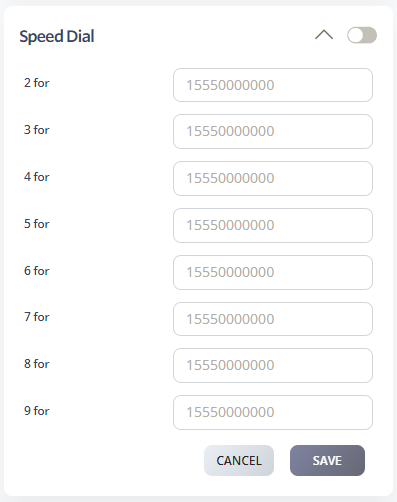
- Enable the Speed Dial feature using the toggle switch. Configure speed dial assignments for digits 2–9:
- 2 for: Enter phone number (e.g., “028900000”)
- 3 for: Enter phone number (e.g., “028900000”)
- 4 for: Enter phone number (e.g., “028900000”)
- 5 for: Enter phone number (e.g., “028900000”)
- 6 for: Enter phone number (e.g., “028900000”)
- 7 for: Enter phone number (e.g., “028900000”)
- 8 for: Enter phone number (e.g., “028900000”)
- 9 for: Enter phone number (e.g., “028900000”)
- Assign meaningful numbers to each speed dial code
- Click SAVE to store the speed dial configuration
- Test by dialing the assigned codes to verify quick-dial expansion
- Update numbers as contacts change to keep assignments current