








Purpose
Voicemail Service provides automated voicemail functionality for missed calls with professional message management capabilities. Furthermore, this comprehensive system allows callers to leave messages that users can retrieve via phone, email, or web portal. Because security is paramount, the system includes security controls and notification options.
How to Navigate
Begin by logging into the SIPcity portal. Then, access SwitchBoard | Inbound | Voicemail Service section.
How to Configure
- Activate Voicemail Service
- Record or upload a Voicemail message greeting
- Configure Busy message storage options
- Set up Voicemail answers and notification settings
- Configure Keyword universal access codes
- Set up email delivery for voicemail messages
- Configure Require PIN for message retrieval
- Enable Trusted callers bypass options
- Set up Email delivery preferences
- Test voicemail functionality and save configuration
Voicemail Settings
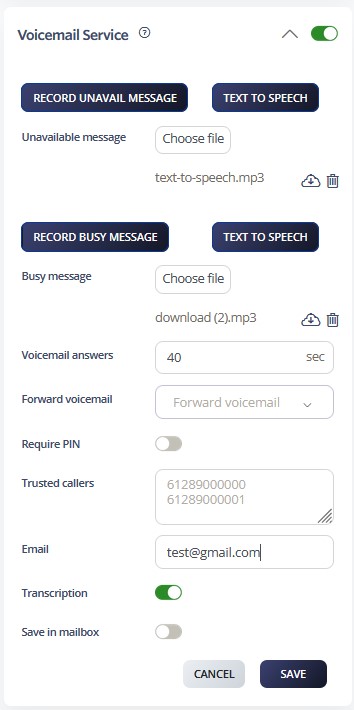
- Record Greeting: Use the dial back feature to enable your Auto Attendant or upload a higher-quality recording quickly.
- Text-to-Speech: This feature automatically converts written text into natural-sounding audio, allowing system messages, announcements, or prompts to be delivered to callers without the need for pre-recorded audio files.
- Voicemail Answers: Configure the number of seconds to wait before redirecting an unanswered call to voicemail.
- Forwards Voicemails: This feature allows you to send a received voicemail message to another user or extension, ensuring important messages can be quickly shared or redirected to the appropriate recipient.
- Requiere PIN: When accessing voicemail from a phone not directly linked to your mailbox, a PIN code is required. Dial
*55during the message playback, then enter your password, followed by the#key. - Trusted callers: Create a list of trusted numbers to bypass the PIN entry step. When dialing
*55from a trusted number, you will be granted direct access without authentication. - Email: Specify an email address to receive voicemail transcription messages.
Voicemail Access
- Accessing Your Voicemail Box – Dial
*55to access your voicemail inbox. - Voicemail Star Access – From any phone, dial your own number and wait for it to reach voicemail. Press
*55, enter your PIN (previously set), followed by#to access your messages. Trusted numbers can also be configured to bypass the PIN requirement. - New voicemails can be reviewed by logging into your account and navigating to the Messages tab.
Call Flow Priority – #12
Voicemail Service functions at priority level 12. Consequently, it captures messages as the final fallback when users bypass all other features.
Conference → Rejection Strategy → Auto Attendant → Call Que → Sim Ring → Do Not Disturb → Preserve CLI → Call Screening → Hunt Groups → Call Waiting → Call Forwarding → Voicemail
Learn more about Call Flow Priority →